I had an old Kindle Paperwhite from 2012 lying around doing nothing, and a robot vacuum whose app is incredibly annoying. So the Kindle became an always-on screen in the living room: the time, today’s weather, my calendars for the week, and a big Start vacuum button. (・ω・)ゞ
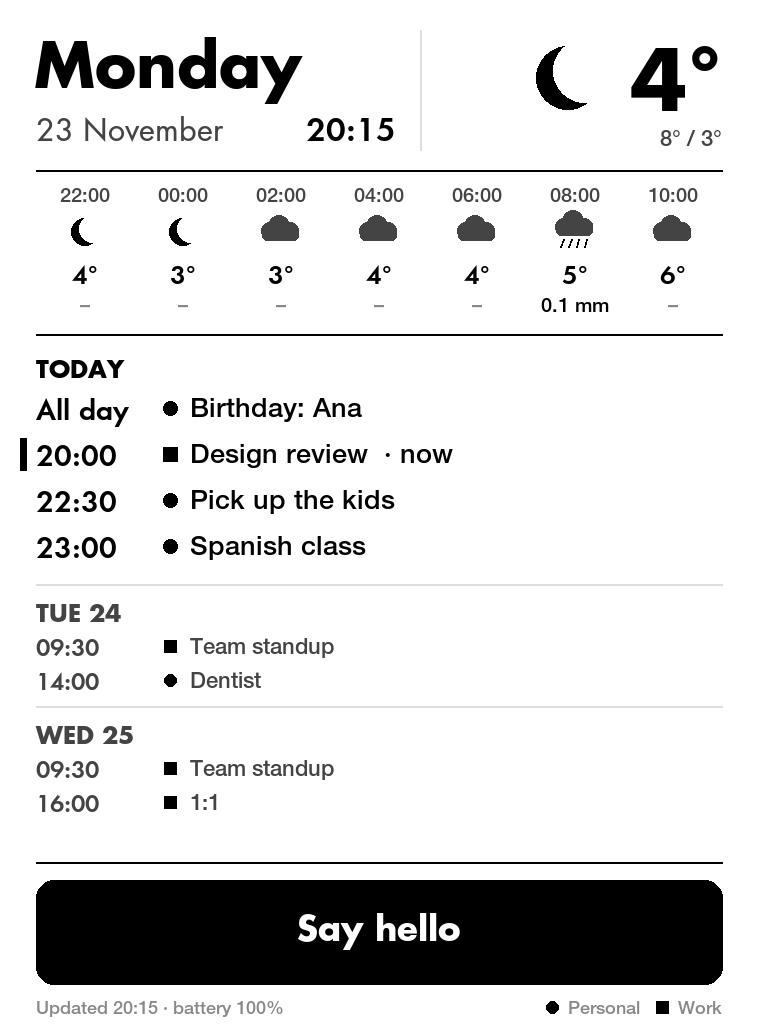
Going straight to the deep end
The easy route is to open a web page in the Kindle’s browser. I wanted it done properly instead, so I jailbroke it. Mine was on firmware 5.6.1.1, which has no simple jailbreak. The trick is to downgrade it to an older version (5.3.3) using Amazon’s own update file and jailbreak that one instead.
Not everything went smoothly of course: 凸(⊙▂⊙✖ )
- The usual app launcher refused to open, claiming it “isn’t signed by an authorized developer”. The system log showed the signature was fine and the launcher was simply crashing. I skipped it.
- The Kindle rejected the tool I needed for remote access. The jailbreak works by tricking the updater into running a script as admin, so I used that same trick to install the tool myself. After that I could log in from my laptop over USB.
- A Kindle in airplane mode can’t set its own date. The downgrade reset the clock to 2012, and fixing it took briefly turning on Wi-Fi.
Drawing it
I looked at the ready-made options (Home Assistant plus a screenshot tool, or TRMNL), but they each need a server, a subscription, or a newer Kindle. So the Kindle does everything itself (because of course it’s running Linux): a small Python program downloads the weather from Open-Meteo and my calendars as iCal links, draws the screen with Pillow, and pushes it to the e-ink display. Only the clock area refreshes each minute, which avoids the ugly full-screen flash.
The vacuum is controlled entirely over the local network, with no iRobot cloud and no app login. Fun lesson: the robot ignores “go home” while it’s cleaning. You have to pause it first, wait until it says it has stopped, and only then send it home.
Making it boring (in a good way)
It’s going to sit in the living room, and I never want to touch it again. So it has to be robust. ᕙ(⇀‸↼‶)ᕗ
The first real-world test came quickly: the weather service replied “the service is overloaded”, and my clock froze at 16:16.
The worst part of e-ink is that a dead dashboard looks exactly like a working one, because the screen keeps the last image forever. Now every part of the screen survives bad data on its own, keeps the last good values, retries, and restarts itself every night. The ticking clock doubles as the “I’m alive” signal.
The repo is meant for robots <|°_°|>
This isn’t a product, and it isn’t generic: everyone’s devices are different. So the repository is written to be handed to Claude Code. It contains a playbook with every Kindle quirk I hit (jailbreak path, how to get access, how to keep it awake, how to stop the stock interface from drawing over the dashboard). You tell it what you want on your screen, and it writes the custom pieces, like a button for your lights instead of a vacuum.
Tech stack
- Device: Kindle Paperwhite 1, jailbroken, running the MobileRead community’s Python 3.9 and FBInk for drawing to the screen
- Code: Python + Pillow, iCal parsing with
recurring-ical-events, standard library only for the vacuum - Data: Open-Meteo (free, no API key), any iCal calendar link
- Built with: Claude Code, over one long afternoon