I now track all my workouts with a Garmin watch, and I use Obsidian as my personal OS and used to track workouts there. The two never talked to each other. I wanted the colour-coded heatmap calendar I had in obsidian to show my new workouts as well as import the ones I didn’t track since I got the watch.
All in all, this took a few hours to implement using Claude Code. Unfortunately, I am going back to work this week. The party may be over for a while before I get some more free time.
How it works
A Python script authenticates against Garmin Connect (once, via OAuth — password never stored), pulls activities, and writes each one as a note in the vault’s workouts/ folder. Every note is pure YAML frontmatter so Dataview can query it.
The script runs automatically every morning at 09:00 and on every login via a macOS launchd job.
Activities are mapped to one of eight broad categories for colour coding, while still storing the specific Garmin activity name for display:
| Colour | Category | Examples |
|---|---|---|
| 🟠 Orange | Strength | Strength training, HIIT, yoga |
| 🔴 Red | Cardio | Running, walking |
| 🟡 Yellow | Cycling | Road, indoor, e-bike |
| 🟢 Green | Team Sports | Football, volleyball |
| 🔵 Blue | Water Sports | Surfing, swimming |
| 🟤 Brown | Hiking | Hiking, trekking |
| 🩷 Pink | Climbing | Bouldering, rock climbing |
| ⬜ White | Winter Sports | Skiing, snowboarding |
Category-specific stats are stored per note — pace and distance for running, volume for strength, max speed for skiing, attempts and sends for climbing, and so on.
The view
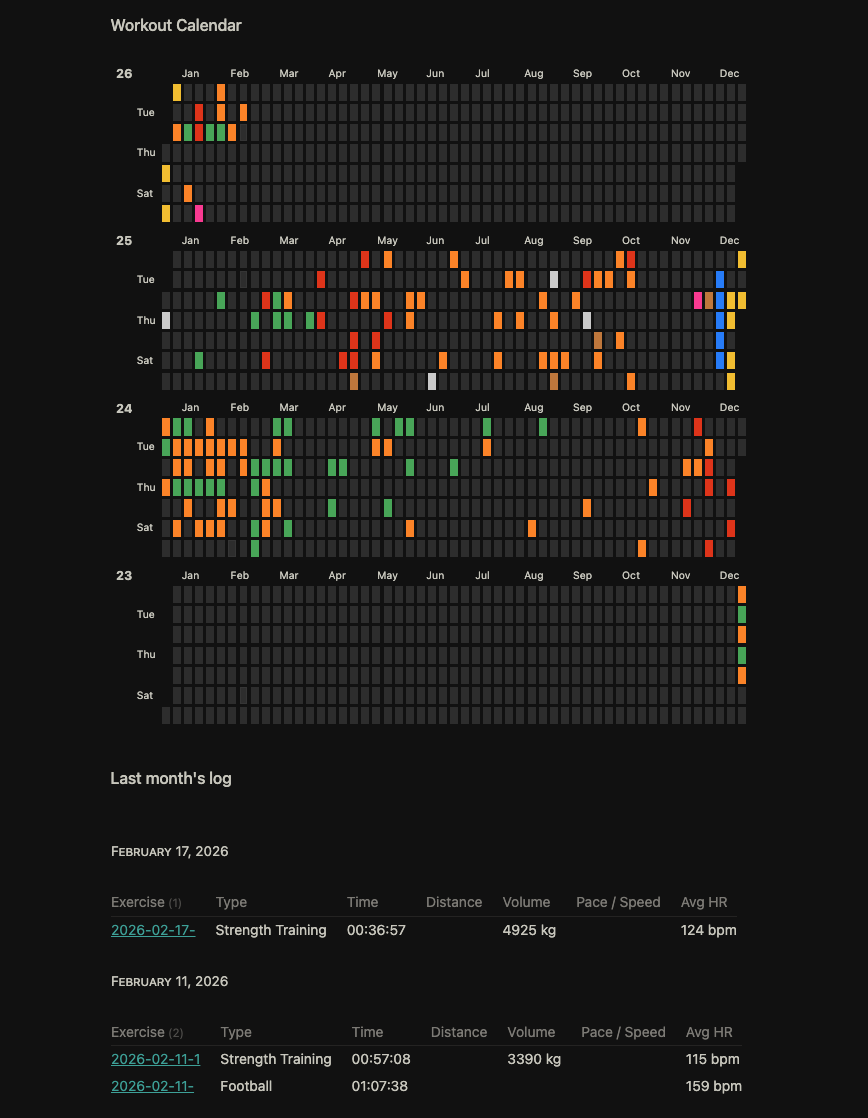
A stacked year-per-year heatmap calendar (via Heatmap Calendar plugin), and a last-month log grouped by date showing the key stats per session.
Result
There is a demo vault in the repository for you to see what it looks like.
https://github.com/avelouk/garmin-sync-obsidian