My wife wanted to build something together, and we somehow landed on the fact that both of us hate doing groceries ( ˇ෴ˇ ). Autonomous AI agents are getting popular at the same time, so why not? We will get AI to do our weekly groceries and keep our pantry stocked with minimal input from us. <|°_°|> The only thing we want to do is decide what we are going to cook during the week.
The Concept
Here is the Concept with the MVP defined.
We have landed on browser use as it seemed to be a simple and cheap (potentially free) way to control the browser using an LLM.
Feeding the concept to Cursor’s agent first was a great idea, as it kept the AI on track and allowed us to move step by step without creating too much spaghetti code.
Status
We are using the MVP! ٩(◕‿◕)۶
Update after a few weeks: This is amazing, best idea ever. There are minor things to improve but as it is, it saves a ton of time and energy.
Current Flow:
Paste recipe (or URL) → LLM parses → save to SQLite database. Pick recipes for the week → checklist (LLM merges duplicates) → confirm → the agent opens a browser and adds items to cart.
How it went
We started with a brief discussion on what the most important headaches we want to solve with this are, came up with the MVP, and implemented it in a few evenings.
It ended up costing ~30-50 cents per grocery haul in API fees, which is quite reasonable for the time it saves. Local models are likely an option.
The more interesting part was getting the LLM to make good choices when looking for the items in the supermarket. Each of us ended up making a version, and we chose the better/simpler one.
Info
Fun fact: the language barrier is officially broken! We just told the model that the website is in Spanish, and it worked perfectly without missing a beat.
Approach 1: Scrape search results and process
Two phases. First, the browser builds a catalog: for each ingredient, it runs a search task, then a structured-extraction prompt so the LLM returns product id, name, price, package quantity, unit, and form from the current page. That catalog is fed into an offline LLM pipeline that picks the best product per ingredient; the browser then gets one short task per chosen product to add it (by name/ID and quantity), plus a final verify task.
Ingredient matcher prompts. Three uses of the LLM: (1) Convert ingredient quantity to a base unit (weight→grams, volume→ml, count unchanged), with rules and context (e.g. garlic cloves); (2) From a product list, return IDs that match the ingredient (exact, synonyms, fuzzy, form); (3) Same conversion for each product’s package size so everything is comparable. The rest (filter by quantity, multi-package, overbuy penalty, pick cheapest) is deterministic code.
Browser tasks. Login; per-ingredient search + extraction; if catalog exists, per–cart-item add-by-name/ID and quantity, then verify; if catalog is empty, fallback per-ingredient “find, pick best, add, next.” No vision.
Approach 2: Fully rely on browser use (Chosen for simplicity)
One task per item. After a single login task, the agent gets one self-contained task per grocery line. Each task includes the item name, amount, form (fresh/canned/etc.), and flags for optional and pantry.
Spanish by instruction. We tell the agent the site is in Spanish and that all search and product interaction must be in Spanish. We do not use a fixed form map; we ask the model to translate the form when searching (e.g. “canned” → “enlatado”).
Structured checklist. Each item task is a short, numbered checklist: (1) search in Spanish, (2) review results, (3) pick an option that matches the required form, (4) prefer better price per kg, (5) check cart and quantity, (6) add to cart with the correct total quantity. We spell out quantity clearly (e.g. “20 cloves = add enough for 20 cloves, not just 1 or 2”) to avoid underbuying.
Optional extras. For non-optional items we add fallback instructions: try a reasonable substitute if the exact item isn’t found. For pantry staples we add a line to prefer larger packs when the per-kg price is better.
No vision. The agent runs with use_vision=False; it follows the text instructions and the page DOM only.
The interface
Once everything was working, it was time to make it cute and fun to use. We ended up with something that looks like this.
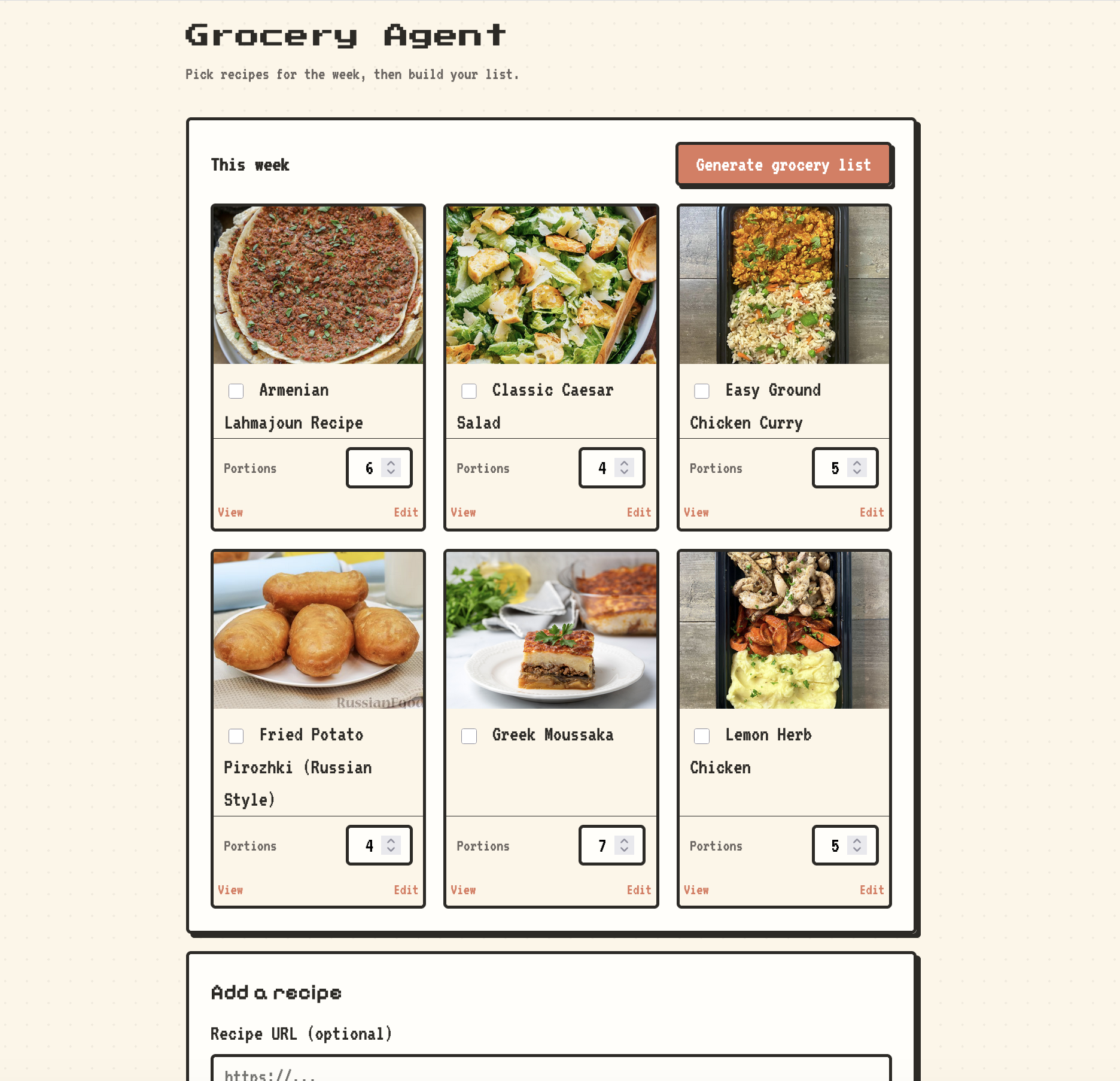
The recipe input can be a bit janky, so I added a manual edit option to fix the little mistakes. This is rare and needs to be done once, so it’s not a time waster.
We’ll add more of our favorite dishes, and our groceries will always be a few clicks away.
TechStack (If this is bad, blame the AI)
- Language: Python 3.11+
- Web: FastAPI, Uvicorn, Jinja2 (server-rendered HTML)
- Data: SQLite (recipes/ingredients), Pydantic (models + LLM structured output)
- LLM: browser-use (ChatBrowserUse for jumbo, ChatGoogle/Gemini flash for recipes & ingredient normalization)
- Browser automation: browser-use (Agent + Browser for jumbo.cl)
- HTTP / scraping: httpx, trafilatura (recipe URL fetch)
- Tooling: uv (venv + deps), python-dotenv (env)